NoteSheet 360 logo NoteSheet 360
Sheet music for ensembles

The conductor picks one song —
it opens on every player's tablet,
each in their own key.

Trumpet in B♭. Alto sax in E♭. Horn in F. Trombone in bass clef. Automatically — no transposing by hand, no twelve versions of the same chart.

Free download · 7-day trial · 3 songs and one conversion · Android tablets
Conductor
C
Trumpet
B♭
Alto Sax
E♭
French Horn
F
Trombone
Bass

Turn a page — it turns for everyone. Press play — a cursor runs the score on every stand, in time.

The whole story, in one film

From a photographed page to an ensemble playing together

Photograph a score → the app converts it → every player gets their own part in their own instrument's key → and everyone plays, following one synchronized cursor.

One page turn
The conductor turns. Every stand turns.
One file, every instrument
The same piece opens in each player's key.
In time, everywhere
One cursor runs the score on every stand.

The piece in the film is an original composition of ours, written for this demo.

A real demo

The conductor picks. Every player gets their own page.

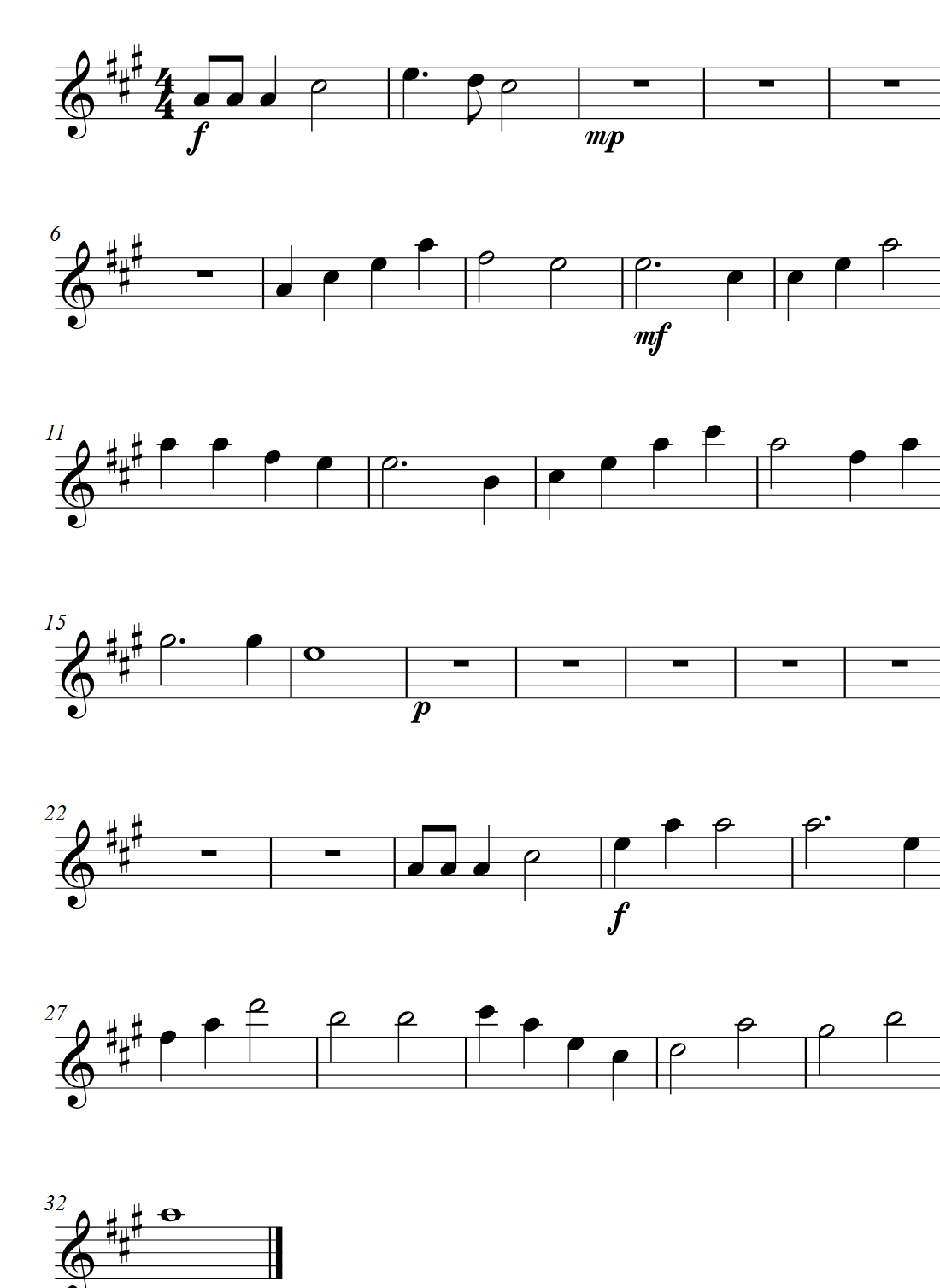
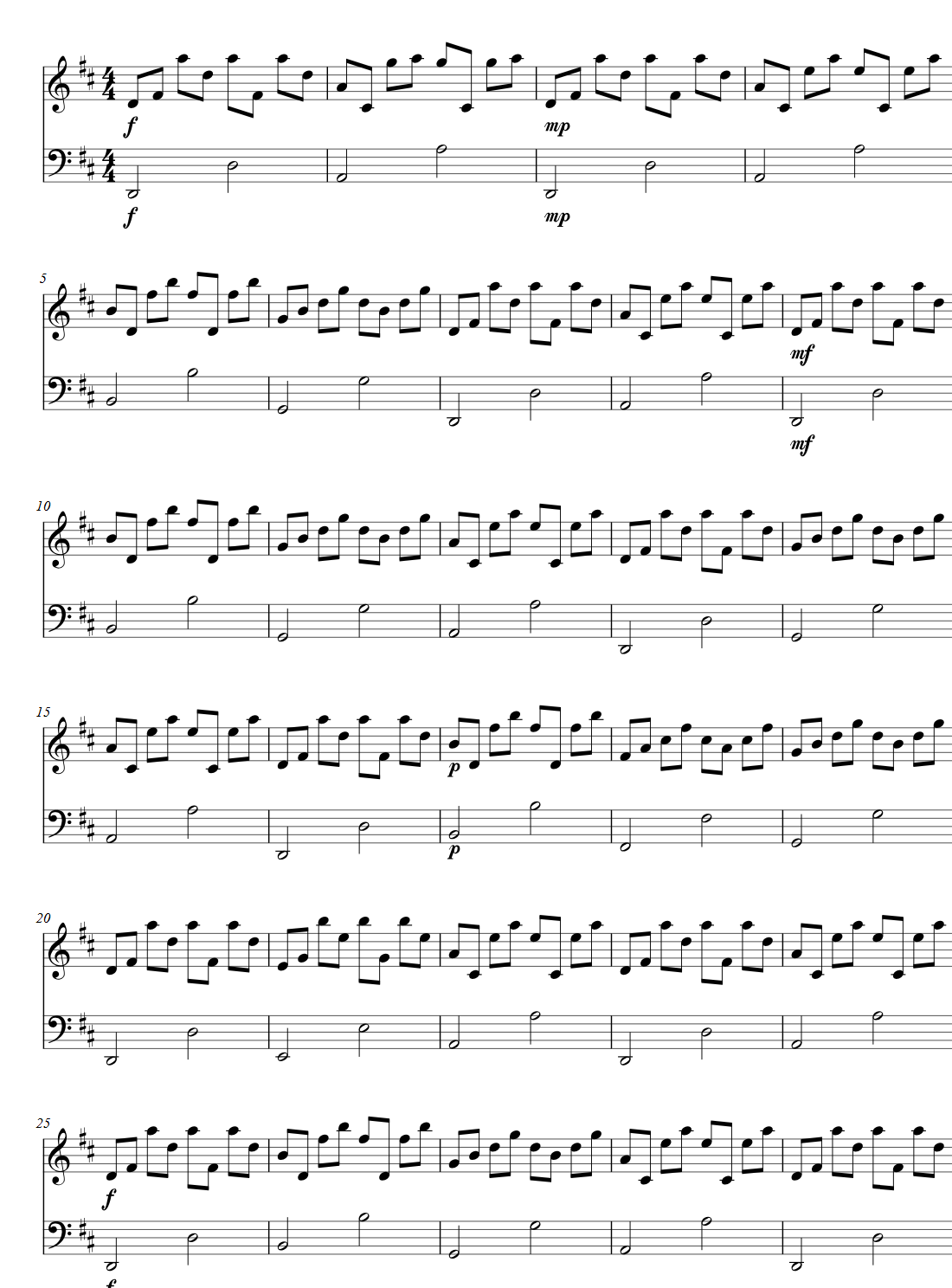
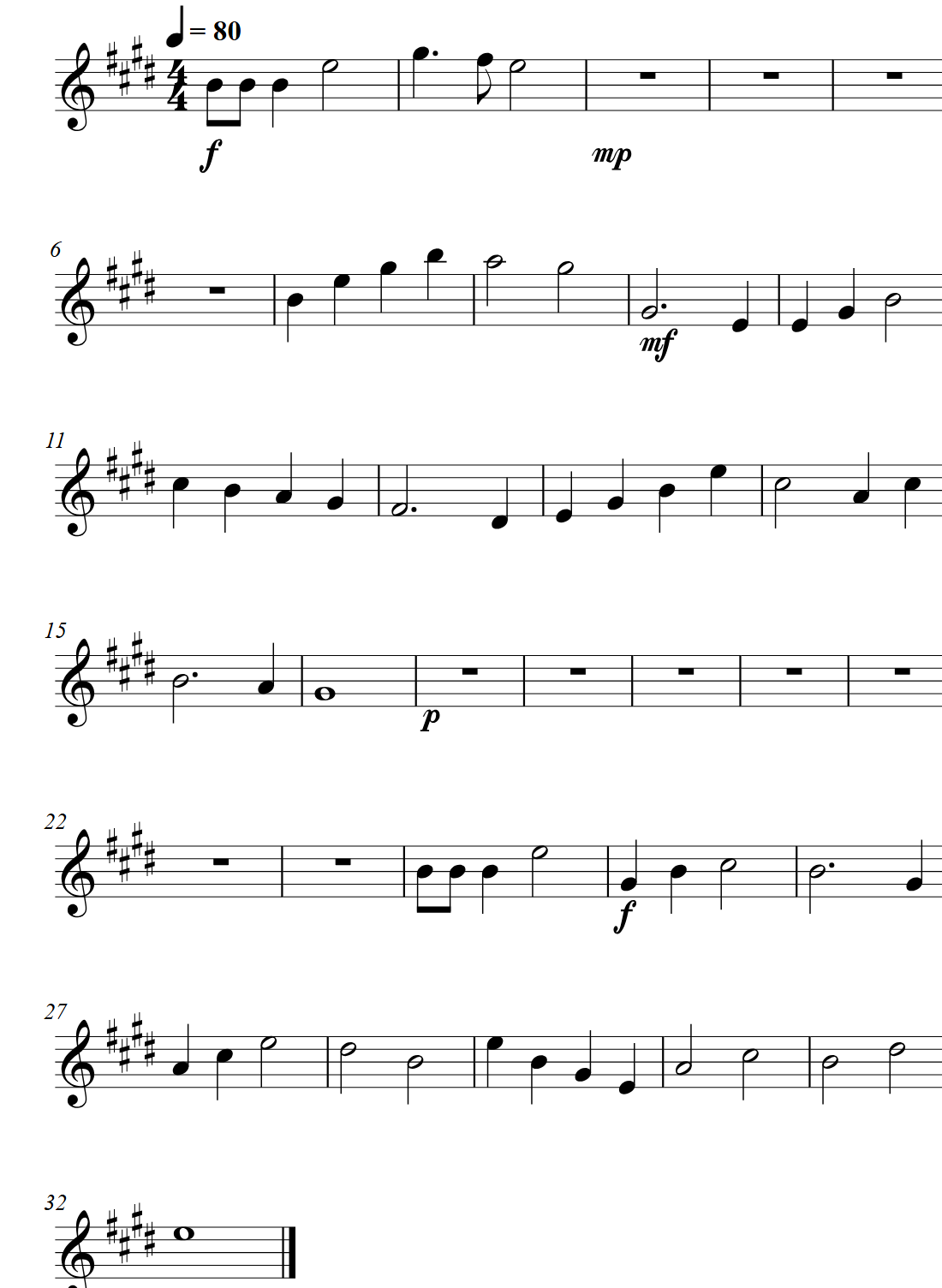
These are not mock-ups: four real score pages the app rendered from one single file. Look at the signs after the clef — four sharps, three, two. Nobody transposed anything.
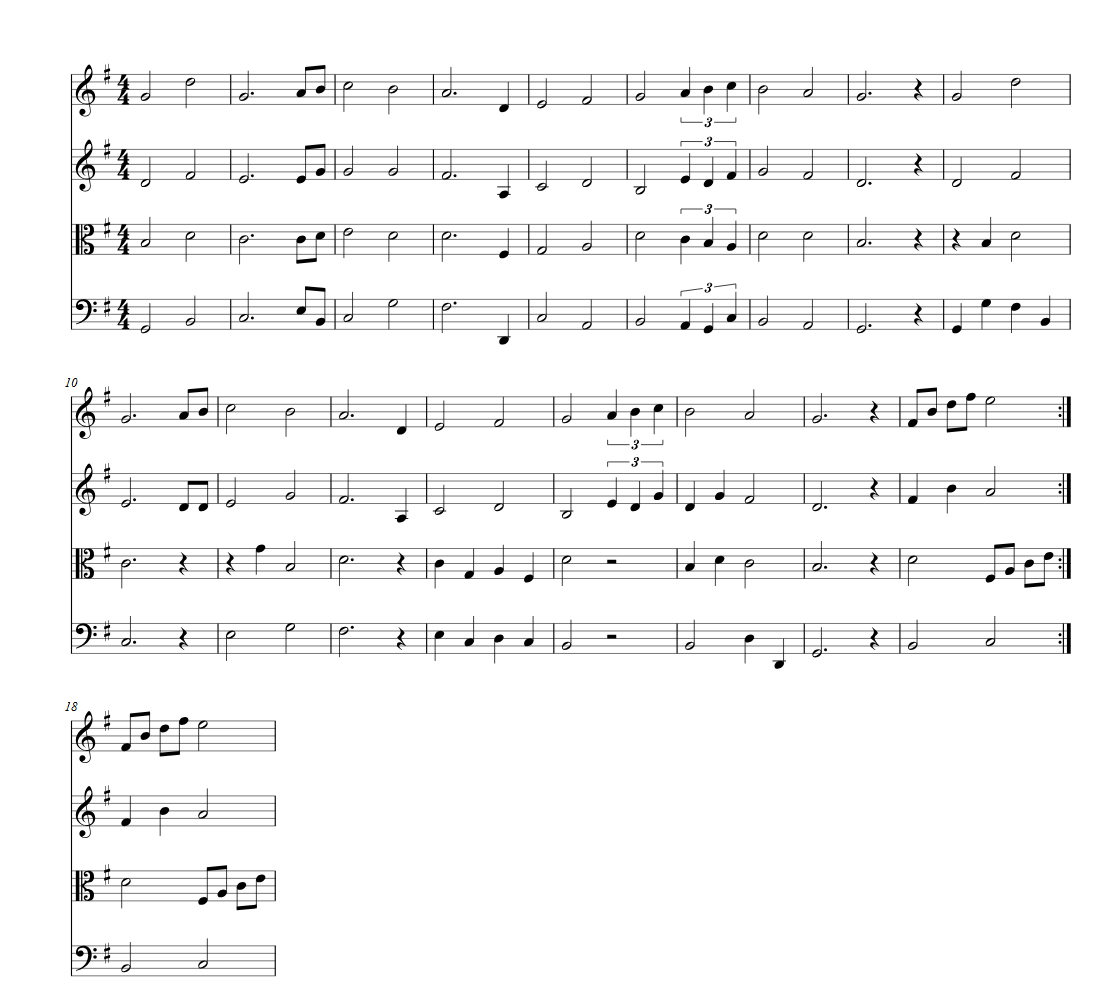
The conductor's tabletFull score · every instrument
The conductor's full score — all ten staves of the piece on one page
TrumpetB♭ · 4 sharps
The trumpet part, written for a B-flat instrument: four sharps in the key signature
French hornF · 3 sharps
The same piece in the horn part in F: three sharps in the key signature
PianoConcert pitch · 2 sharps
The same piece in the piano part at concert pitch: two sharps in the key signature

The green line is the synchronized playback cursor — it runs on every stand, together.

Get it

The app is on Google Play

Available in 177 countries and 25 languages. The download is free, and your players install nothing at all — they join by scanning a code from the conductor's tablet.

Scan to install NoteSheet 360 from Google Play
Scan from your tablet
NoteSheet 360 — Sheet Music

Install it on the conductor's tablet and open a piece. The player role is free forever; a conductor gets a week with 3 songs and one conversion, and buys a plan inside the app.

Why NoteSheet 360

Everything follows from one thing: every player in their own key

No computer. No internet.
The conductor's tablet is the server. Players scan a code and they're in, with nothing installed on their side. There is no router to blame when something drops mid-concert.
Photo → real notes
Photograph a page from the archive, creased and forty years old, and it comes back as real notation: a key per instrument, a cursor, playback. Handwriting still defeats it.
Built for rehearsal
A marking the conductor writes shows up on every stand. Plus a metronome, setlists, a tuner, vocal removal, and an editor for the fix you make ten minutes before the downbeat.
25 languages
Every player in their own language. Arabic, Russian, Hebrew, Spanish and French are in there.
Three steps

From a crumpled page to a synchronized rehearsal

01
Upload your music
A photo, a PDF or MusicXML. Whole songbooks load as they are, and a single chart is converted into a live score — with the chords, tempo and lyrics on the page.
02
Players scan a code
Each player picks their instrument once, and that's it. Nothing to install, nobody to sign up.
03
Pick a song — and play
The song opens for everyone at once, each in their own key. Page turns, the playback cursor, the metronome and markings — all run together.
Inside the app

This is what it really looks like

Actual screenshots, not renders. (The app ships in 25 languages — shown here in Hebrew.)
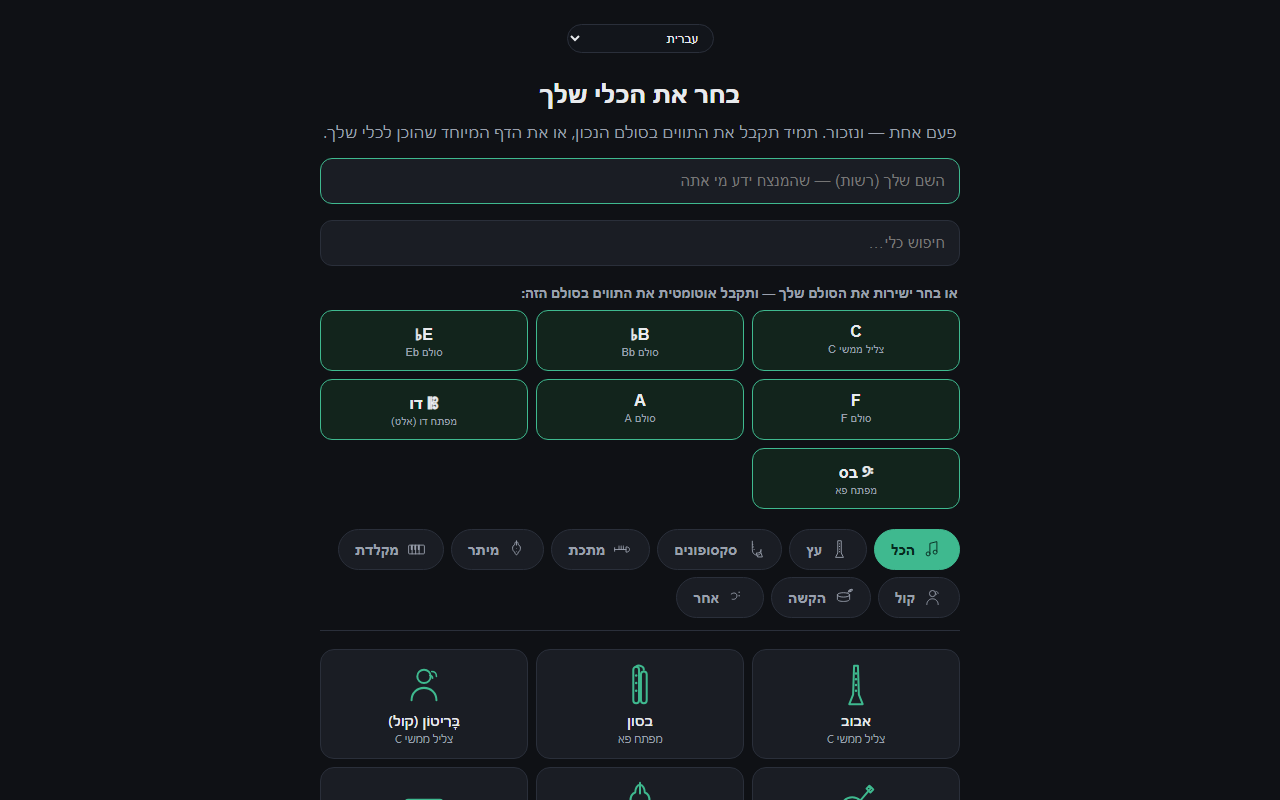
The player's instrument-picker screen — ready-made keys and instrument cards with line-art icons
A player picks an instrument once — or jumps straight to a key (B♭ / E♭ / F / bass clef)
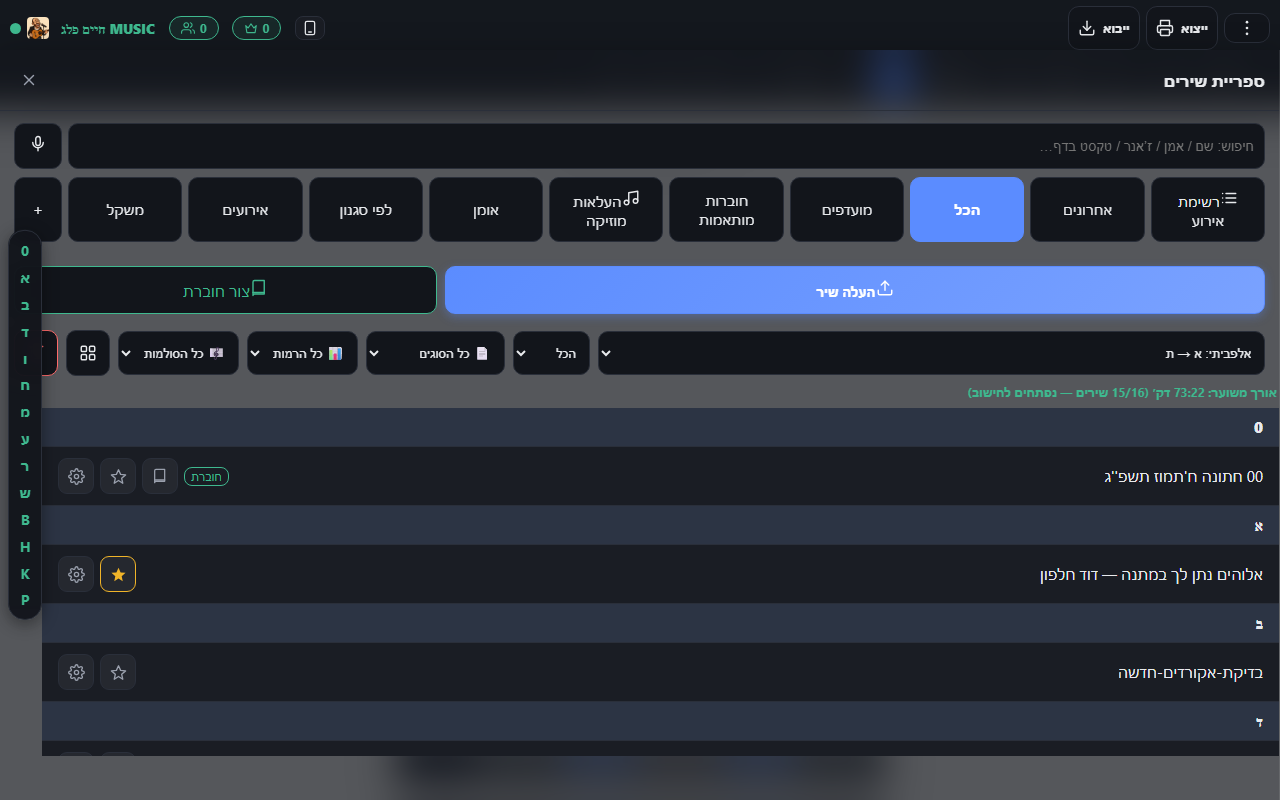
The conductor's song library — tabs, search, setlists and songbooks
The conductor's library — search, favorites, songbooks and setlists
What does need internet
Exactly three things: one-time registration, photo-to-notes conversion, and vocal removal. During a rehearsal or a performance — zero internet: all syncing runs on a local network, and you can pre-download the whole evening's setlist to the device.
Wind & brass bands School music programs Klezmer ensembles Choirs Teachers & students
Pricing

One licence on the tablet that runs the group — players never pay

The plan is set by how many players connect to the conductor's tablet. A player who joins by scanning a code installs nothing, signs up for nothing and pays nothing, ever. Plans are bought inside the app, through Google Play.

Trial
Free
7 days, no credit card
  • Up to 4 connected players
  • 3 songs in the library
  • One photo-to-score conversion
Download free
Single player
₪19.90/mo
or ₪199 a year
  • Personal notation app: scan, edit, export
  • 10 conversions a month
  • Unlimited library and playback
Buy in the app
Small group
₪49.90/mo
or ₪499 a year
  • Up to 5 connected players
  • 25 conversions a month
  • Unlimited library and editor
Buy in the app
Most common
Full ensemble
₪79.90/mo
or ₪799 a year
  • Up to 25 connected players
  • 50 conversions a month
  • Unlimited library and editor
Buy in the app
Orchestra
₪119.90/mo
or ₪1,199 a year
  • Up to 60 connected players
  • 75 conversions a month
  • Unlimited library and editor
Buy in the app
Unlimited
₪169.90/mo
or ₪1,699 a year
  • Unlimited connected players
  • 100 conversions a month
  • Built for schools and institutions
Talk to us
And for a player who wants the app on their own tablet — ₪50 a year
Joining a rehearsal and reading your part in your own key is free, always, with nothing installed. The Player tablet plan is for someone who also wants to practise at home on the same app: tuner, playback, practice meter, recording and a video room — plus screenshot blocking, which some groups require. ₪50 a year per tablet, yearly only.
Need more conversions? Add-on packs inside the app: ₪29 for 50 pages · ₪99 for 200 pages. They never expire.
Prices are set in shekels and Google Play converts them to your local currency at checkout, so what you see in the store is what you pay.
Schools and institutions: write to us for bulk purchase, an invoice, or a session with your group.
Talk to us

Install it and start. If something comes up, we are here

The app installs from Google Play and works straight away. Write to us if you are an institution that needs a bulk purchase and an invoice, if you want a session with your group, or if something is not working the way it should.

Write to us directly
info@notesheet360.com

Say what kind of ensemble and how many players. That's enough for us to answer something useful.

The button opens your own mail app with the message ready — no forms, no passwords.